Caesar: Zooniverse's Classification and Decision Engine
Caesar is Zooniverse’s decision engine and real-time data processing pipeline. Caesar monitors volunteer classifications as they come in to summarize, aggregate, and act on them in real time. Research teams can configure Caesar for a number of use cases, such as:
- Retire Subjects based on specific classification criteria,
- Build cascading workflows that advance Subjects to additional Subject Sets,
- and additional advanced patterns of use (such as Feedback, Transcription, Correct-a-Machine, Leveling Up, SWAP, etc.)
On this page, we will provide a general overview of Caesar and links to existing resources. If you have any questions, please contact us at contact@zooniverse.org.
Adding Caesar to your Workflow
Any existing Zooniverse Workflow can have a corresponding Caesar configuration by navigating to caesar.zooniverse.org/workflows and clicking on the +Add button in the top right corner. In the box that pops up, enter in the Workflow ID of the existing Zooniverse Workflow you would like to configure. This can be found at the top of the Workflow page in the Project Builder, as shown below.
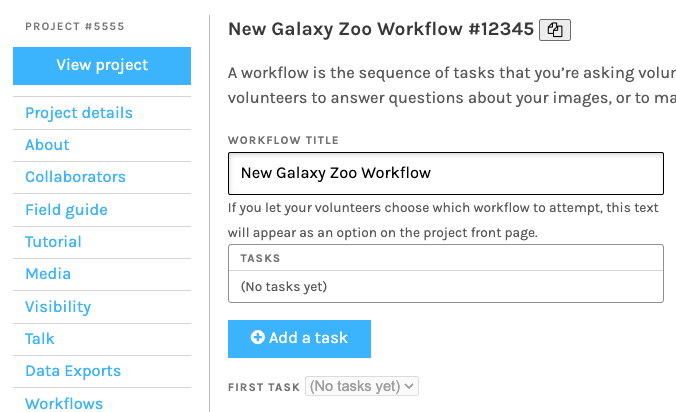 Figure 1:Example screenshot showing how to find the Project and Workflow IDs on the Workflow page. The project ID is shown in the top left, above the Project Builder menus and the workflow ID is shown at the top of the page.
How Caesar Works
Caesar processes volunteer classifications in three sequential steps: Extractors, Reducers, and Rules & Effects. Both Extractors and Reducers can be scripts run externally.
Step 1: Extractors
Extractors are tools that allow Caesar to extract specific data from the full classification output. Caesar features a collection of extractors with most designed for specific task types in your workflow (e.g., question, drawing, etc):
- Blank Extractor – Checks whether a submitted classification is blank, outputting
blank=trueif so. Useful for filtering uninformative responses. - Question Extractor – Suited for question tasks; retrieves the answer index from a classification. This is the standard tool for any multiple choice or yes/no question tasks in your workflow.
- Pluck Field Extractor – Used to retrieve a value from the classification or the subject metadata (for example, if the subject filename or associated metadata is needed during aggregation).
- Survey Extractor – Designed for survey-style tasks where volunteers select from multiple options provided by the project team.
- Shape Extractor – Handles drawing tasks where volunteers mark regions, points, or shapes on a Subject.
- External Extractor – Passes the classification data to an external URL, which responds with the extracted data. This allows research teams to use their own custom extraction logic hosted outside of Zooniverse.
Details for each of these extractors can be found here: https://zooniverse.github.io/caesar/#extractor-types.
Step 2: Reducers
Reducers compile a set of extracts together to create an aggregated result. For example, a set of classifications for a question task can be combined to determine which answer is the consensus.
Reducers can be configured to run in two different modes: default and running reduction. When a new classification arrives, Caesar needs to decide how to incorporate it into the aggregation. In default reduction mode, each time a new extract is created, Caesar fetches all of the other extracts for that subject and sends them to the reducer together. Running reduction mode, by contrast, eliminates the need to load large numbers of extracts for a given subject, making it more efficient at scale, though it adds complexity and is not recommended for use with external reducers.
For most research teams, default reduction mode is the simpler and safer choice unless a project has specific requirements or very high classification volumes.
Zooniverse currently has the following reducers available, with detailed documentation available here:
- Consensus Reducer — Determines the majority answer across all volunteers for a given subject. Ideal for question or survey tasks where you want the most common response.
- Count Reducer — Counts how many times each response option was selected. Produces a straightforward tally of volunteer votes per answer.
- Unique Count Reducer — Counts the number of unique responses, useful when you want to know how many distinct answers were given rather than vote totals.
- Simple Stats Reducer — Calculates statistical summaries (e.g., mean, variance) across numeric extracts.
- Summary Stats Reducer — Produces higher-level summary statistics across a set of reductions, useful for monitoring or reporting across a large subject set.
- First Extract Reducer — Returns only the first extract for a given subject, ignoring subsequent classifications. Can be useful for certain expert-annotation workflows or carrying through metadata.
- Placeholder Reducer — A pass-through reducer that stores extracts without aggregating them.
- SQS Reducer — Instructs Caesar to send the output of an extractor to an AWS SQS queue, allowing remote aggregation code to consume and process those extracts asynchronously and without having to maintain a dedicated server to accept extracted data.
- External Reducer — Allows data to flow out of the Caesar system to another web service that can provide custom reduction functionality. This is how teams plug in machine learning models or bespoke aggregation algorithms.
Beyond these reducers, the Panoptes Aggregation package (Zooniverse’s companion aggregation library) provides additional specialized reducers for common use cases.
Step 3: Rules & Effects
A workflow can be configured to have one or many rules and/or effects. Research teams specify conditions for each rule and determine the resulting effect(s) when the condition evaluates to true. These conditions for Rules, documented here, can be nested to achieve complicated if/then logic and rules may pertain to either Subjects or volunteers.
When a rule evaluates as true, Caesar triggers one or more Effects, such as:
- Retire the Subject, recording the retirement reason and removing it from the volunteer queue once sufficient consensus is reached
- Add the Subject to a Collection or Add the Subject to another Subject Set, allowing automated routing of subjects that need further review or additional classification
- Send the Subject to an external URL, triggering downstream processes in your own research Infrastructure