Project Talk Boards: Best Practices and Job Descriptions
Overview
“Talk” is the name for the discussion forum attached to each Zooniverse project. This venue provides volunteers and researchers a place to comment on individual subjects (photos, videos, or audio files that comprise the dataset within the project) they encounter, as well as ask questions, provide feedback, and discuss project details. Most projects invite volunteers to participate on Talk after they have finished a task in the main interface, i.e. classifying or marking an image, or transcribing a manuscript page, etc. Most tasks end by giving the volunteer the option to progress to the next task or to discuss the thing they’ve just classified over on Talk, and Talk is therefore a core feature of any Zooniverse project.
An exciting result of Talk usage: conversations can lead to additional research discoveries! Several examples include the Green Peas galaxy discovery on Galaxy Zoo, which has resulted in an important publication, and the major antedatings of “white lie” and “partner” from Shakespeare’s World, which have been incorporated into the Oxford English Dictionary. Beyond basic interactions (e.g., FAQ, flagging and fixing bugs), Talk provides opportunities for volunteers and research teams to interact and explore a project’s data outside the confines of the Classify interface.
Maintaining vibrant and active Talk boards is important to keeping volunteers engaged with your project, ensuring your data is completed in good time. Project research teams are responsible for keeping a project going, which not only means adding new data as the project progresses, but also maintaining a welcoming and interesting space for interaction on Talk. We encourage that project teams incorporate additional members, including Talk Moderators and Guest Researchers, which will be described in detail below.
How To Setup Talk Boards
Talk boards are set up via the Talk tab in the Project Builder. All projects come with a board called “Notes” -- this is subject-specific, and its posts are generated via the “Done & Talk” option from the classification interface.
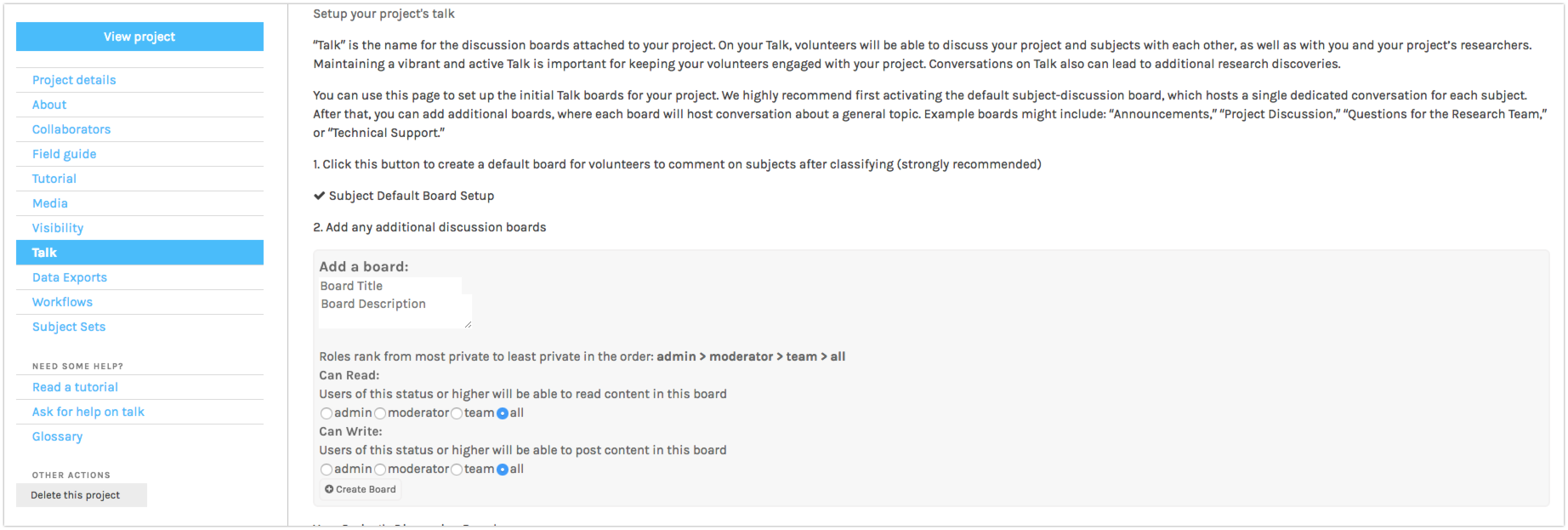
Examples of Boards
- Glossary (for vocabulary questions, too)
- News (for project updates from the research team)
- Introduce yourself (for volunteers & research team members to introduce themselves)
- Help and technical issues (ask for tech help, report bugs, etc.)
- Questions for the research team
- FAQ
QuickTalk: In-classifier Talk Commenting
Overview
This feature creates a mini ‘Talk’ pop-up in the classification interface, allowing volunteers to read and post Talk comments during the classification process. This is limited to comments made on the ‘Notes’ board. This feature is set at the project level, i.e. when turned on, it will be applied to all active workflows on your project. If you do not wish for your volunteers to access Talk comments for a given subject before they submit their classification, do not turn on this feature.
Setup
At present, Project Builders must request this feature for their project. Send an email request to contact@zooniverse.org, requesting that QuickTalk be turned on for your project. Be sure to include your Project ID number in your email.
User Experience Description
When a volunteer is participating in a QuickTalk-enabled project, the Classify page for each subject will feature a small ‘Discussion’ icon in the bottom right corner of the screen. This icon will either appear without a number, or with a number, depending on the number of Talk comments that subject has received.
Clicking on the icon will open a pop-up box where volunteers can read existing comments from other volunteers or research team members, as well as post their own comments directly from the Classify page.
Vocabulary and Core Features
Board: Named, thematic sections of Talk. Try to keep posts within these boards focused on their topics; this will help with ease of finding & revisiting posts later. Use the “Board Description” section to explain the board’s purpose and the type of content visitors should post.
Hashtag: Encourage participants to use #hashtags so that other people can quickly find subjects with a specific theme or content.
@ mention (individual): To bring a post or discussion to the attention of a specific user, use the @ symbol before that person’s username -- @username, for example. That user will receive a notification that they have been mentioned.
@ mention (group): To bring a post or discussion to the attention of a group of people, use the @ symbol before a group (see list below). That entire group will receive a notification that they have been mentioned.
- @admins - mention the project administrators (owners & collaborators)
- @moderators - mention the project moderators
- @researchers or @scientists - mention the project researchers
- @team - mention the entire project team
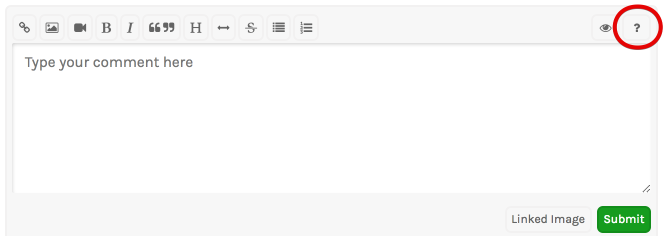
Further information on formatting (“A Guide to Commenting in Talk”) can be found using the ? icon above the text entry field:
Talk Team Roles
Moderators
Moderators (or “mods”) are important members of a project research team, and these roles are often filled by content specialists, community members, or veteran volunteers who are keen to help answer questions on Talk. These individuals are identified with a label in Talk and play a critical role in welcoming new participants and bringing threads to the attention of the research team by using the researcher’s @username or a key #hashtag. Moderators can spend as little or as much time on the project as they like. They’re doing you a favor, so be mindful of their time.
It’s good to recruit individuals for the mod role before launch. They can be members of your project research team or they could be volunteers from the community whom you identified during the beta testing phase. As your project progresses, be on the lookout for users who are participating frequently -- if they’re spending a lot of time classifying, they might be good Mods! Additional mods can be recruited after project launch and added at any time.
Read more about the role of Mods in this document.
Guest Researchers
Some projects contain such a diversity of data that no individual researcher could ever have all the relevant expertise or time to answer volunteers’ questions. This is often the case with large GLAM or humanities datasets. For this reason, some projects recruit guest researchers, who come on board for particular periods of time when a new dataset is launched. These individuals are invited to join the project to answer specialist questions on Talk, and over time could pose some of their own questions and request volunteers to deploy special hashtags for their research.
Guest researchers have access to data generated on the project, but unlike project owners or core team researchers they are not responsible for ensuring the use or publication of the final datasets. They can contribute as much or as little time on Talk as they like, but half an hour a week is generally good. During the launch of a new project or a new dataset, guest researchers may wish to spend more time on Talk because this can help them generate more interest in their own topic and also allow them to meet more volunteers, and with luck, retain them.
Other Opportunities
Guest researchers and mods may also be invited to write blog posts if the project has a blog, and contribute to social media in other ways, if this is of interest to them.
Helpful Guidelines for Talk
(Adapted from a Talk post from Shakespeare’s World):
Put in the time: Plan to spend at least 1 hour/week answering questions -- if you aren’t participating on the board, your community will grow frustrated. Engagement with your community shows commitment to the project, and appreciation for the work that your volunteers are doing.
Keep mentions to a minimum: When people have posted on a thread they will receive a notification about any new post. Try to avoid mass-tagging sessions otherwise other volunteers will be flooded with new notifications, and the discussion itself will get pushed a long way down the index.
Enjoy yourself and be kind to others: Talk is a fun and informative place for us to share ideas, observations and questions with each other. Everyone has something unique to bring to the conversation so remember to be constructive, polite and helpful in all of your interactions! Please see this post for more information about Zooniverse Talk Community Standards.
Keep hashtags focused: Hashtags help researchers, moderators, and volunteers find aspects of particular interest in among the thousands of pages, and pressing questions that arise while people are transcribing. Avoid general hashtags that provide details already contained within the classification or subject metadata. Instead, use hashtags to highlight specific items of interest.
Suggest hashtags: The project builder’s Talk page has a tool for submitting hashtag suggestions. These will be weighted higher in autocompletion results, and also populate a list on the Talk boards which will be viewed by your community at the project’s launch. Communities will typically develop their own hashtags, but it’s useful to suggest some at the beginning, particularly if you know there’s something you want flagged up (e.g. #damaged to indicate a subject which may be difficult to engage with due to wear and tear, or other content-related information to be flagged).
Create collections: If there is a topic of particular interest to you, use the heart (favorite) icon and the little list icon underneath an image on Talk to collect them. You can make public or private collections for class, your own research or just for fun.
If you need any more help, please ask on the Zooniverse-Wide Talk Boards!